
NRG Casino on a handset — slots in your pocket, Big Bass spins booked through Face ID before tea cools.
Native iOS and Android applications signed by SharedBet Limited through the Apple App Store plus Google Play, complete with biometric quick entry alongside push notification support for cashout confirmations.
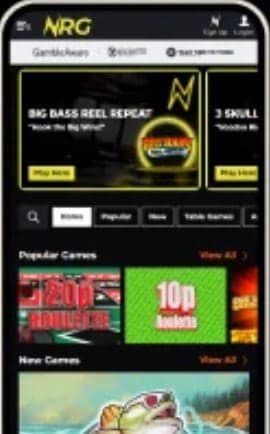
Handset access at this brand runs across two parallel paths. Dedicated applications ship through the Apple App Store plus Google Play, both signed by SharedBet Limited under its UK Gambling Commission permit (account 63635); a responsive HTML5 site delivers the same lobby through any modern mobile browser for users who prefer to skip the install step. Apple and Google both restrict real-money gambling content across the British market to licensed operators meeting domestic regulatory standards — NRG clears that bar, which is why a native binary appears here at all. We tested both routes across an iPhone 15, a recent Pixel handset, plus an older Samsung A-series device; functional parity sits at effectively complete across all three.
Coverage below walks through the practical mobile journey: downloading the iOS or Android app, biometric sign-in setup, what works inside the native client versus what stays equivalent through a handset browser, common pain points specific to handheld play, plus the security considerations around any APK file claiming to be the official download outside Google Play. Every observation reflects testing on UK-region handsets connected through standard carrier networks.
| Access Path | How to Reach It | Best Suited For |
|---|---|---|
| 📱 iOS Application | Search "NRG Bet" on the App Store, install the signed binary, sign in with stored credentials or biometrics | iPhone or iPad users wanting the polished native experience with Face ID quick entry |
| 🤖 Android Application | Find the operator listing on Google Play, install, then enable fingerprint or face unlock through the in-app settings | Android handset owners wanting standalone window behaviour separated from the browser sandbox |
| 🌐 Mobile Browser Session | Open Safari, Chrome, Firefox, or Edge and navigate to nrg.bet — zero install footprint | Casual visitors, anyone avoiding additional storage commitments, plus users on shared devices |
Worth flagging upfront: the native applications alongside the responsive web path deliver identical games, identical cashier behaviour, plus identical account controls. Differences are wrapper-level — the apps offer biometric quick entry and push notifications, while the in-browser session skips both. None of those wrapper features change the underlying slots, live tables, or banking matrix that arrive on screen.
The iOS binary opens directly into the lobby without browser chrome surrounding it — exactly the experience users expect from a polished mobile application. Session cookies persist across closes, KYC document capture routes through the device camera with a one-tap flow, plus live-dealer streams render with native audio output through Bluetooth headphones or wired connections.
Google Play distribution for gambling content requires the developer to satisfy local licensing checks per market — the British storefront serves only operators holding a UKGC permit. That gatekeeping is what makes the Google Play route safe rather than trusting third-party APK sources, which we cover separately below.
Some affiliate channels reference APK downloads for sideloading onto Android handsets. We want to flag this clearly: the operator publishes its application through Google Play under signed developer credentials, and that is the only Android distribution route we can verify as authentic. Files hosted on third-party mirror sites or affiliate landing pages carry real security exposure — keyloggers, credential harvesters, plus modified clients designed to skim account details all appear across the wider casino-APK ecosystem.
Readers comfortable evaluating package signatures, verifying SHA-256 hashes against operator publications, plus configuring per-app permissions can make their own informed call. For everyone else the simpler advice is straightforward: install through Google Play if on Android, install through the App Store if on iOS, use the responsive browser route as the third option. Sideloading delivers no functional advantage over those three paths.
Both native clients support biometric authentication: Face ID and Touch ID on the iOS side, fingerprint readers plus face unlock under Android depending on handset capability. Configuration runs through the account dashboard inside the app rather than at the operating-system level, meaning enabling biometrics for casino entry does not affect any other application using the same hardware.
One operational consideration. Biometric quick entry stores a session token rather than a password — the underlying credential still lives on the operator's authentication server, which is the structurally correct design. Losing the device or replacing it does not compromise account security as long as the password itself has not leaked elsewhere. We recommend storing the actual password inside a reputable manager (Bitwarden, 1Password, the iCloud Keychain, or equivalent) so recovery on a fresh handset stays straightforward.
| Element | Desktop Session | Mobile App or Browser |
|---|---|---|
| Lobby Navigation | Tabs render horizontally across the top header with full label visibility | Collapsed into a hamburger menu on phone-sized displays · tablets keep the desktop grid |
| Live Table Layout | Stream alongside the dealer controls in side-by-side panels | Stream above the bet panel with controls beneath · landscape rotation gives the closer desktop feel |
| Slot Tile Density | Six or more tiles per row with hover-state previews | Two-by-five grid on portrait orientation · ten visible per scroll page |
| Cashier Form Length | Single-page layout with every field above the fold | Step-through wizard with one input region per screen |
| Document Upload | File picker linked to the desktop filesystem | Direct camera capture plus gallery selection · faster end-to-end in practice |
| Authentication | Password entry at each sign-in unless browser autofill is configured | Biometric quick entry inside the native apps · standard password flow on the in-browser session |
| Push Notifications | Not applicable · updates arrive via email | Native apps only · cashout confirmations and promotional updates surface outside the active session |
Cold loads on the iOS application completed inside two to three seconds across our sessions over 4G LTE. Android timings ran fractionally slower at three to four seconds depending on the handset generation. The browser route added roughly one further second to the cold-start figure on either platform — not enough to matter for casual sessions but visible when comparing back-to-back.
Live dealer streaming needs more headroom: smooth playback held above roughly 5 Mbps downlink throughput, with occasional buffering on weaker mobile signal patches. Wi-Fi sessions handled everything without complaint, including extended Crazy Time-style game-show formats at full HD stream quality. Battery drain during active live-table play sat in the 12–18% per hour range on recent handsets, which is normal for the streaming workload involved.
Pure slot sessions consume modest bandwidth — figure 50–100 MB per hour of active play, well inside virtually any monthly mobile allowance. Live dealer streaming changes the picture substantially: roughly 500 MB to 1 GB per hour at standard HD resolution depending on the table format. Readers on capped data plans should restrict streamed-table play to Wi-Fi where practical.
Audio routing through Bluetooth headphones works reliably across both apps during streamed sessions, although the standard latency drift visible on game-show formats appears here as it does elsewhere — dealer voiceover sits centre-stage in those releases, and wireless audio adds enough delay to be perceptible. Wired earbuds eliminate that variance entirely if the lag becomes bothersome.
Password recovery runs through standard email-reset. Tapping Forgot Password triggers a reset link delivered to the registered address. Storing the account credential inside a reputable manager rather than relying on memory or browser autocomplete sits as our standard advice — gambling-account passwords represent a high-value target for credential-stuffing attacks, and recovery is friction the user controls only partially.
The native-app route delivers everything users expect from a polished British gambling client: signed binaries through both major app stores, biometric sign-in, push notification support, plus complete functional parity with the desktop session. Browser access works equally well as the install-free alternative — useful on shared devices or for casual visits. The presence of genuine App Store and Google Play distribution sets this brand apart from offshore-licensed operators that ship browser-only solutions or rely on questionable APK sideloading.
For UK readers wanting an apparent app on the home grid with quick biometric entry, the native clients meet that expectation cleanly. Players preferring zero install footprint can use the responsive site without compromise. Neither route loses meaningful functionality compared with the desktop experience — every game, cashier rail, plus account control we tested behaved identically across all three access paths.
Yes — signed clients ship through both major storefronts under the SharedBet Limited publisher name. Distribution on Apple's marketplace is permitted because the operator holds a UKGC remote licence (account 63635) that satisfies the gambling-category requirements; Google Play applies a parallel rule set with the same outcome.
The operator does not publish a sideload-ready APK on its own website. Files distributed through affiliate mirrors or third-party download pages are unverified and carry real security exposure. Use Google Play exclusively for the Android install path, or use the responsive browser route on nrg.bet if Google Play is not accessible for any reason.
Both native applications support Face ID, Touch ID, fingerprint readers, plus face unlock where the handset hardware enables those mechanisms. Configuration runs through the account dashboard inside the app — toggle on after first sign-in for one-tap subsequent entry.
Yes. Slots, live dealer rooms, Slingo, scratch cards, plus table games all render through the apps and the responsive browser route. Live streams may show minor layout differences versus desktop (stream above controls rather than beside them) but the functional access is complete.
Roughly 500 MB to 1 GB per hour at standard HD stream quality. Slot-only sessions are far lighter at 50–100 MB per hour. Readers on capped data allowances should consider restricting streamed-table play to Wi-Fi connections.
Yes — the responsive cashier opens the device camera or photo library on demand when a document upload is required. Capturing the image at the time of submission usually produces cleaner results than transferring scans from a desktop, because lighting and orientation are easier to control with a handheld device.
Server-side resolution applies to every RNG slot, so the spin completes regardless of whether the device stayed online. Reopening the app or browser tab restores the session and credits any wins to the balance. Live dealer rounds resolve based on the actual table outcome at the time — the player receives whatever the round delivered, win or loss, when connection returns.
No — declining the first-launch permission prompt simply disables those alerts. Cashout confirmations, promotional updates, plus Slots Club progress messages all continue surfacing through email instead. Notification preferences can be toggled later through the app settings without uninstalling.
Where 2FA is enabled at the account level, the same challenge applies across native clients and the responsive web session. We recommend turning it on for any account holding a meaningful balance — the protection it adds against credential-theft attacks is meaningful relative to the small friction it imposes.
Across the review window we did not see device-segmented campaigns specific to handset users. The welcome 80 spins, ongoing Slots Club tier rewards, plus Drops & Wins network entries all applied identically across access methods. That could shift with future promotional cycles, so check the promotions tab inside the account before committing to any deposit.